



ITGmania v1.0.0
About
This is the v1.0.0 release of ITGmania. With all the huge changes in this release, as well as a licensing change, this update has been marked as the first major release of ITGmania :) Thanks to the community for all the support! Please read all the changes below! There are a lot of cool things!
Quick TL;DR
1. Pack.ini - Add custom Sorting, Banners, and SyncBias.
2. Chart Parsing in Engine - Powers many useful Simply Love features
3. Tech Analysis - A more robust algorithm for doing tech analysis. Powers the ITL Online 2025 pointing this year.
4. Practice Mode Support - Jump into practice from the song wheel
5. Performance Improvements - General performance and sync stability changes across the code base.
IMPORTANT NOTES
- Windows users should now specify
SoundDrivers=DirectSound-swoverWaveOut(if previously specified) - You WILL need to resync your game with this release!
Features
Pack.ini
Pack.ini (case-sensitive) is a way to provide some metadata for a pack available on the song wheel.
While we could obviously jam a lot of random fields, we wanted the Pack.ini to represent functional changes vs. being a catch all for every possible descriptor for a pack. The most notable features are described below:
1. SyncBias - The most useful feature of Pack.ini (imo) is the ability to define the SyncBias of a pack. Long time ITG players know that when creating a chart they would normally write the chart synced to the down beat (i.e. to NULL), and then finally have a postprocessing step to add 9ms to account for what the sync of arcade ITG machines were almost 20 years ago. This step is painful as it's kind of arbitrary as well as if a stepartist forgets to apply the bias, or applies it wrongly, then it'd feel offsync relative to other songs.
To move to a world where we can eventually eliminate this bias we introduce the SyncBias field in this Pack.ini spec.
Valid values for SyncBias are either NULL or ITG (case-sensitive).
- If the songs in this pack have an the 9ms bias applied, you want
ITG - Otherwise you want
NULL.
With these specifications, you can now sync your machine to NULL and the game will internally handle shifting ITG packs to NULL such that they will remain on sync.
Eventually in the future as more and more packs adopt this standard, they can stop applying the bias and we can move away from it entirely. There is also a machine preference to determine what the default SyncBias should be for packs that don't have a Pack.ini (which is all historical packs). Currently you want generally want this to be ITG (if you're playing ITG centric content), otherwise NULL.
2. Sorting - Historically once pack releases in a series hit 10, they would be incorrectly sorted, i.e. they'd show up in the song wheel as:
Mute Simz 1
Mute Simz 10
Mute Simz 2
...
With the introduction of SortTitle, one can control how in the song wheel they should be sorted. That way even though the Display Title
in this example could be MuteSimz 10, the SortTitle could be set to something that comes after Mute Simz 9. One approach to do this is to 0 pad all the numbers in the series when defining the SortTitle (e.g. Mute Simz 001, Mute Simz 002`, etc.)
3. Series - One common problem overtime is the sheer size of the song wheel when there is so much content out there. Series lets use combine similar packs together as being part of a Series. While this feature is currently unused, it'll be useful once we create these groupings.
Here is a Pack.ini template one can use.
[Group] Version\=1 DisplayTitle\= TranslitTitle\= SortTitle\= Series\= Year\= Banner\= SyncOffset\=
And a sample Pack.ini can be seen below (comments and linebreaks are optional):
[Group]
The current version of the Group/Pack.ini file.
Determines what keys we should consider.
Version\=1
How we want the pack's title to be shown in the game.
DisplayTitle\=ITL Online 2025
Same as above, but when transliterations are enabled.
TranslitTitle\=ITL Online 2025
How we want the *sorting* for this pack to be handled in the song wheel.
SortTitle\=ITL Online 2025
What series this pack is a part of. Currently unused.
Future releases will allow grouping of packs together in the song wheel based on this value.
Series\=ITL Online
What year this pack was released. Currently unused.
Allows us to sort by year for a pack in a future release.
Year\=2025
Explicitly specify a banner for the pack.
Previously you couldn't reasonably specify a pack banner, but now you can.
This is also how we can support video banners for packs.
Banner\=itl-online-2025-bn.png
Whether or not this pack is NULL or ITG synced (this are the only two valid values for this field. It IS case sensitive).
SyncOffset\=ITG
Chart Parsing in Engine
For quite a while now, Simply Love parses the sm/ssc files for a large amount of functionality. This includes things like measure counter, column cues, tech analysis, chart hashing for GrooveStats submission, and so on. While there have been optimizations to keep the player experience pretty reasonable, parsing the files is notoriously slow.
Starting with this release, ALL of the chart parsing is available in the to the engine (hashing will be available next release). This means that we'll some efficiency gains and also opens the door for many useful future features, such as sorting by NPS, or potentially even sharing scores across charts. While the Simply Love release only makes use of the updated tech analysis algorithm, that information is now available.
NOTE: Because a lot of the chart parsing is done up front on program load, you WILL see considerably slower start up times as the game computes the tech analysis.
All the chart parsing information is then cached so future starts should still be fast.
Tech Analysis
This could have been coupled with the above header, but I thought it was significant enough to warrant its own section.
Simply Love previously had a somewhat simplified implementation to perform chart analysis. That algorithm wouldn't consider things like holds or mines, which would sometimes generate incorrect tech counts. There were so many outliers that previous ITL Online events could not rely on them for point assignment.
Starting with this release, we perform the tech analysis with a brand new algorithm that is much more reliable, and can even scale to different panel arrangements in the future. I could write out a lot more on how it's done, but I'd rather link to this amazing writeup by the actual contributor here:
https://mjvotaw.github.io/posts/step-annotation/step-annotations/
Practice Mode Support
Previously Edit Mode (and in turn Practice Mode) was hard coded to only support the P1 player. Attempting to use P2 in edit mode would crash the game. While Digital Dance did have a practice mode, because of these limitations it was only available for P1. For this release we've made change such that one can use these modes regardless of player, and now we can have true practice mode available to the game.
With this change, one can quickly go from song wheel to practice and back to quickly practice parts of a chart.
Video Performance Improvements
StepMania and its variants have historically pretty poor video rendering causing lag/stutters whenever they were enabled. This release @bwaggone rewrote a lot of the video rendering code such that it can render in a separate thread which should now improve your experience!
Please let us know if you're still running into this issue and also if you've noticed any improvement on your setups!
Various Sync/Performance Updates
@sukibaby is still long at work optimizing and modernizing various parts of the code base. A lot of work from the last release were related to sync drift and from general testing, it seems to be a lot more stable in this release (maybe sync drift is eliminate?? let us know if not!).
One important thing to note is the SoundDrivers=DirectSound-sw is the preferable option to be using now! Historically people would suggest using WaveOut for performance reasons, but with all the additional changes, DirectSound is now way more preferable.
Other Miscellaneous Features
@jsirex - Added a native restart button that one can map a button to to restart songs
@jsirex - Embed libusb into the project for linux. No longer will we have to forcibly add some old libusb version to get the game to launch.
@dinsfire64 - More consistent ordering of devices on Linux. Now if you have many devices plugged in, they should always stay mapped correctly
@glitchybear - Add option to select the output display in Windows
@sukibaby - Properly close websocket handlers. Now if people are using things like the Twitch module, their game shouldn't crash when quitting out
@tscalvert - Allow hotplugging devices on linux
@florczakraf - Updating libjepg to libjpeg-turbo. More RPI support.
Installation
The installation process has largely not changed but you can still refer to the instructions below.
Windows
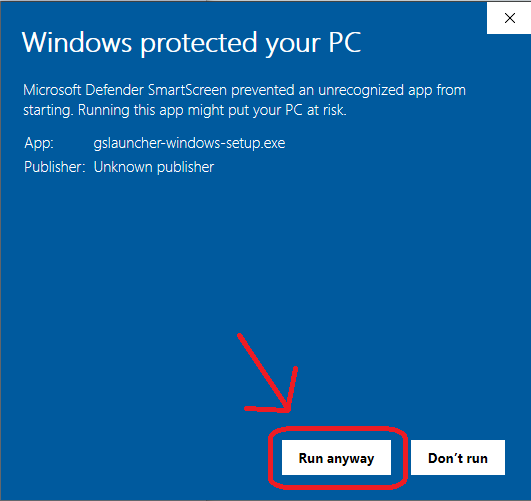
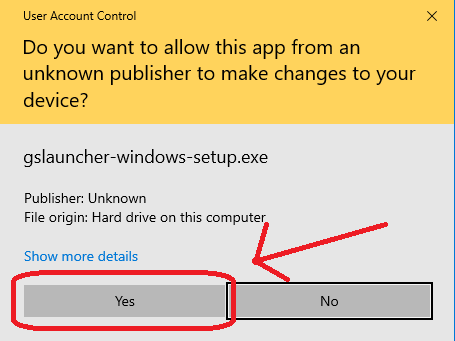
The installer for Windows is not signed, so you will have to click through a couple of security dialogs when running it.

macOS
Move ITGmania.app to /Applications. macOS automatically quarantines downloaded applications that are not signed, so you will have to run this command in the terminal afterwards.
xattr -dr com.apple.quarantine /Applications/ITGmania
You will also likely need to allow Input Monitoring for ITGmania. This can be done in:
System Preferences -> Security & Privacy -> Privacy -> Input Monitoring
If ITGmania already exists in this list, you might need to remove + re-add it.

Linux
Unpack the tarball to your desired location.
Switching from StepMania 5.1 (or StepMania 5.0.12)
Check out the StepMania 5.1 to ITGmania Migration Guide.
Change Summary
Thanks to all who contributed to this release!
For a full summary of changes between v1.0.0 and v0.9.0, check GitHub's comparison of the two.