



ITGmania v1.0.1
DOWNLOAD v1.0.2 INSTEAD
# About
This is the v1.0.1 release of ITGmania. This is a targeted bug fix release of 1.0.0. You'll still want to read the patch notes for 1.0.0 as they are still relevant here. They can be found here
NOTE: THIS VERSION WILL REBUILD THE CACHE SO INITIAL BOOT WILL BE SLOW
# Features
## Bugfixes
- Game crashing on boot when trying to handle very long songs (e.g. 24 hours of 100 bpm from Crapyard Scent) - @phantom10111
- Game crashing when trying to adjust the Fail Type - @CrashCringle12
- MachineSyncOffset not being properly saved - @CrashCringle12
- Fixing a sync issue when the group offset may have not been properly loaded/applied - @sukibaby + @CrashCringle12
- Fix crashes with USBs regarding Pack.ini - @CrashCringle12
- Fixed an issue where refresh rate was reverting to 60Hz between game launches - @sukibaby
- (Temp fix) Don't do any banner caching for video banners - @sukibaby
- Modified some dedicated restart button behavior - @jsirex
- MaxNps + GroovestatsHash caching (these are experimental and may be modified in the future! -- do not rely on them until documented) - @mjvotaw
## Features
- Added support to disable cabinet lights per player - @dando92
- Add bookkeeping screen - @dando92 + @CrashCringle12
- Fixed SextetStream on Windows - @LucaSilva-r
## Simply Love
While these will also be noted in the Simply Love patch notes, I felt it was apt to also mention them here
- QR Login Screen display not respecting the theme preference - @Shraymonks
- QR on the QR login screen not being properly scanned on select Pixel/Android phones (this is a Pixel issue!!!) - @dinsfire64
- Show Quint grade in the song wheel - @teejusb
- Preserve some player options when navigating to practice mode - @CrashCringle12
- Add theme option to disable animated banners in step statistics - @teejusb via @SugoiFactory
# Installation
The installation process has largely not changed but you can still refer to the instructions below.
## Windows
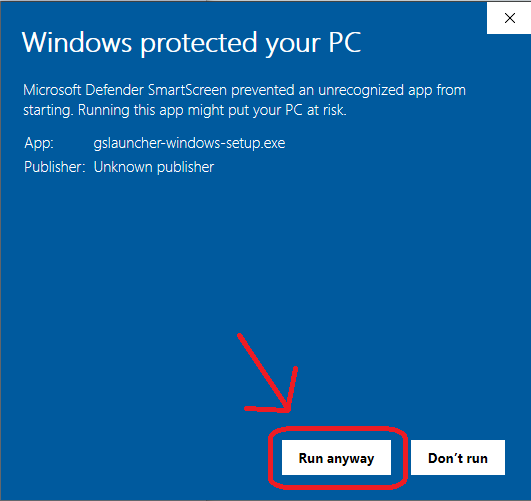
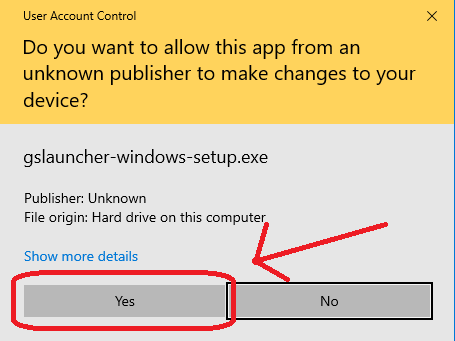
The installer for Windows is not signed, so you will have to click through a couple of security dialogs when running it.

## macOS
Move ITGmania.app to /Applications. macOS automatically quarantines downloaded applications that are not signed, so you will have to run this command in the terminal afterwards.
xattr -dr com.apple.quarantine /Applications/ITGmania
You will also likely need to allow Input Monitoring for ITGmania. This can be done in:
System Preferences -> Security & Privacy -> Privacy -> Input Monitoring
If ITGmania already exists in this list, you might need to remove + re-add it.

## Linux
Unpack the tarball to your desired location.
## Switching from StepMania 5.1 (or StepMania 5.0.12)
Check out the StepMania 5.1 to ITGmania Migration Guide.
## Change Summary
Thanks to all who contributed to this release!
For a full summary of changes between v1.0.1 and v1.0.0, check GitHub's comparison of the two.