



ITGmania v1.0.2
About
This is the bug fix of v1.0.1 release of ITGmania to pull in a crucial sync fix.
Everything else is the same so I'll copy the exact same patch notes below this line:
This is a targeted bug fix release of 1.0.0. You'll still want to read the patch notes for 1.0.0 as they are still relevant here. They can be found here
NOTE: THIS VERSION WILL REBUILD THE CACHE SO INITIAL BOOT WILL BE SLOW
Features
Bugfixes
- Game crashing on boot when trying to handle very long songs (e.g. 24 hours of 100 bpm from Crapyard Scent) - @phantom10111
- Game crashing when trying to adjust the Fail Type - @CrashCringle12
- MachineSyncOffset not being properly saved - @CrashCringle12
- Fixing a sync issue when the group offset may have not been properly loaded/applied - @sukibaby + @CrashCringle12
- Fix crashes with USBs regarding Pack.ini - @CrashCringle12
- Fixed an issue where refresh rate was reverting to 60Hz between game launches - @sukibaby
- (Temp fix) Don't do any banner caching for video banners - @sukibaby
- Modified some dedicated restart button behavior - @jsirex
- MaxNps + GroovestatsHash caching (these are experimental and may be modified in the future! -- do not rely on them until documented) - @mjvotaw
Features
- Added support to disable cabinet lights per player - @dando92
- Add bookkeeping screen - @dando92 + @CrashCringle12
- Fixed SextetStream on Windows - @LucaSilva-r
Simply Love
While these will also be noted in the Simply Love patch notes, I felt it was apt to also mention them here
- QR Login Screen display not respecting the theme preference - @Shraymonks
- QR on the QR login screen not being properly scanned on select Pixel/Android phones (this is a Pixel issue!!!) - @dinsfire64
- Show Quint grade in the song wheel - @teejusb
- Preserve some player options when navigating to practice mode - @CrashCringle12
- Add theme option to disable animated banners in step statistics - @teejusb via @SugoiFactory
Installation
The installation process has largely not changed but you can still refer to the instructions below.
Windows
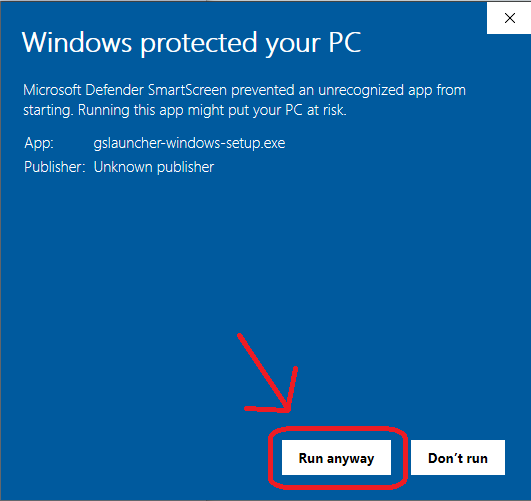
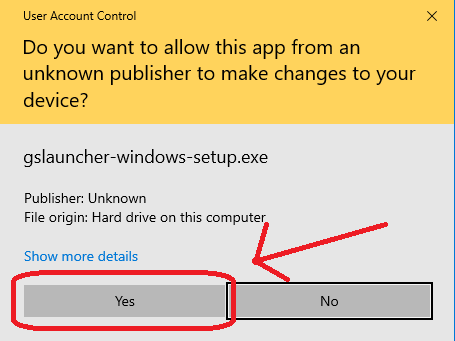
The installer for Windows is not signed, so you will have to click through a couple of security dialogs when running it.

macOS
Move ITGmania.app to /Applications. macOS automatically quarantines downloaded applications that are not signed, so you will have to run this command in the terminal afterwards.
xattr -dr com.apple.quarantine /Applications/ITGmania
You will also likely need to allow Input Monitoring for ITGmania. This can be done in:
System Preferences -> Security & Privacy -> Privacy -> Input Monitoring
If ITGmania already exists in this list, you might need to remove + re-add it.

Linux
Unpack the tarball to your desired location.
Switching from StepMania 5.1 (or StepMania 5.0.12)
Check out the StepMania 5.1 to ITGmania Migration Guide.
Change Summary
Thanks to all who contributed to this release!
For a full summary of changes between v1.0.1 and v1.0.0, check GitHub's comparison of the two.